Last updated: November 20, 2026
The fastest way to think about privacy is to ask who gets your data, why they want it, how long they keep it, and how you can stop sharing more than necessary. Those four questions cut through most privacy notices, app settings, and data requests without turning the process into a law degree.
Key takeaways
- Privacy is usually lost through small choices: default settings, broad permissions, and sign-up forms that ask for too much.
- The useful questions are about collection, sharing, retention, access, and deletion.
- Strong privacy habits are not the same as total secrecy; they are about limiting exposure where it matters.
- A policy that sounds polite can still allow a lot of data use, so the wording matters less than the rules behind it.
- The best choice depends on your risk: casual tracking, targeted ads, workplace data, or something more sensitive.
What should I ask first?
The first question is: what data is being collected right now? That includes obvious items like name and email, but also device IDs, location, contacts, browsing history, and payment details. If a service asks for a phone number, a birthday, or access to your photos, that is a clue to slow down before tapping “allow.”
The next question is why the data is needed. A shipping address has a clear job; access to your microphone usually needs a sharper explanation. If the purpose is vague, the safest assumption is that the company wants more data than it needs for the core service. The FTC’s consumer privacy guidance is a useful starting point here, because it pushes the same basic habit: read what is collected, how it is used, and who it is shared with.
A third question is what happens if you say no. Some services work fine with limited data. Others make privacy trade-offs part of the product. That distinction matters more than any marketing line, because it tells you whether you are dealing with a real choice or a forced exchange.
How do I know if a privacy policy is any good?
A good privacy policy tells you three things plainly: what is collected, how it is shared, and how you can control or delete it. If those details are buried in broad phrases like “for business purposes” without examples, the policy is giving you legal cover, not useful guidance.
Look for specific words about retention, third-party sharing, and user rights. If a policy names categories of partners, says whether data is sold or shared for advertising, and explains deletion steps, that is at least readable. If it avoids plain language and treats everything as “improvements,” “analytics,” or “service optimization,” the real answer is usually that your data moves around more than you would expect.
The National Institute of Standards and Technology’s Privacy Framework is worth knowing because it treats privacy as a risk-management problem, not a slogan. That is the right lens for normal people too: a policy is only useful if it helps you predict where the data goes and what happens next.
What’s the difference between privacy and security?
Privacy is about who gets your information; security is about keeping unauthorized people out. You can have strong security and still have weak privacy if a company collects more data than it needs, shares it broadly, or keeps it for too long.
This difference matters because people often fix the wrong problem. A long password helps if someone tries to break into your account, but it does nothing if an app keeps collecting location data in the background. A locked door is not the same thing as closing the curtains.
| Criteria | Privacy controls | Security controls | Winner for this condition |
|---|---|---|---|
| Main goal | Limit collection and sharing | Prevent unauthorized access | Privacy controls for overcollection |
| Common tools | Permissions, opt-outs, deletion requests | Passwords, MFA, encryption | Security controls for account break-ins |
| What it stops | Tracking, profiling, broad data use | Hacking, account takeover, theft | Depends on the risk |
| Best first step | Reduce data you hand over | Add strong sign-in protection | Privacy controls if the service asks for too much |
| Weak spot | Some data still gets collected | Your data may still be used broadly | Privacy controls if you want less exposure |
| User effort | Often needs settings review | Often one-time setup with updates | Security controls for simple maintenance |
| Visibility | Hard to see data sharing | Easier to spot login warnings | Security controls for alerting you |
| Consequence of ignoring it | More profiling and retention | More account compromise risk | Privacy controls for data minimization |
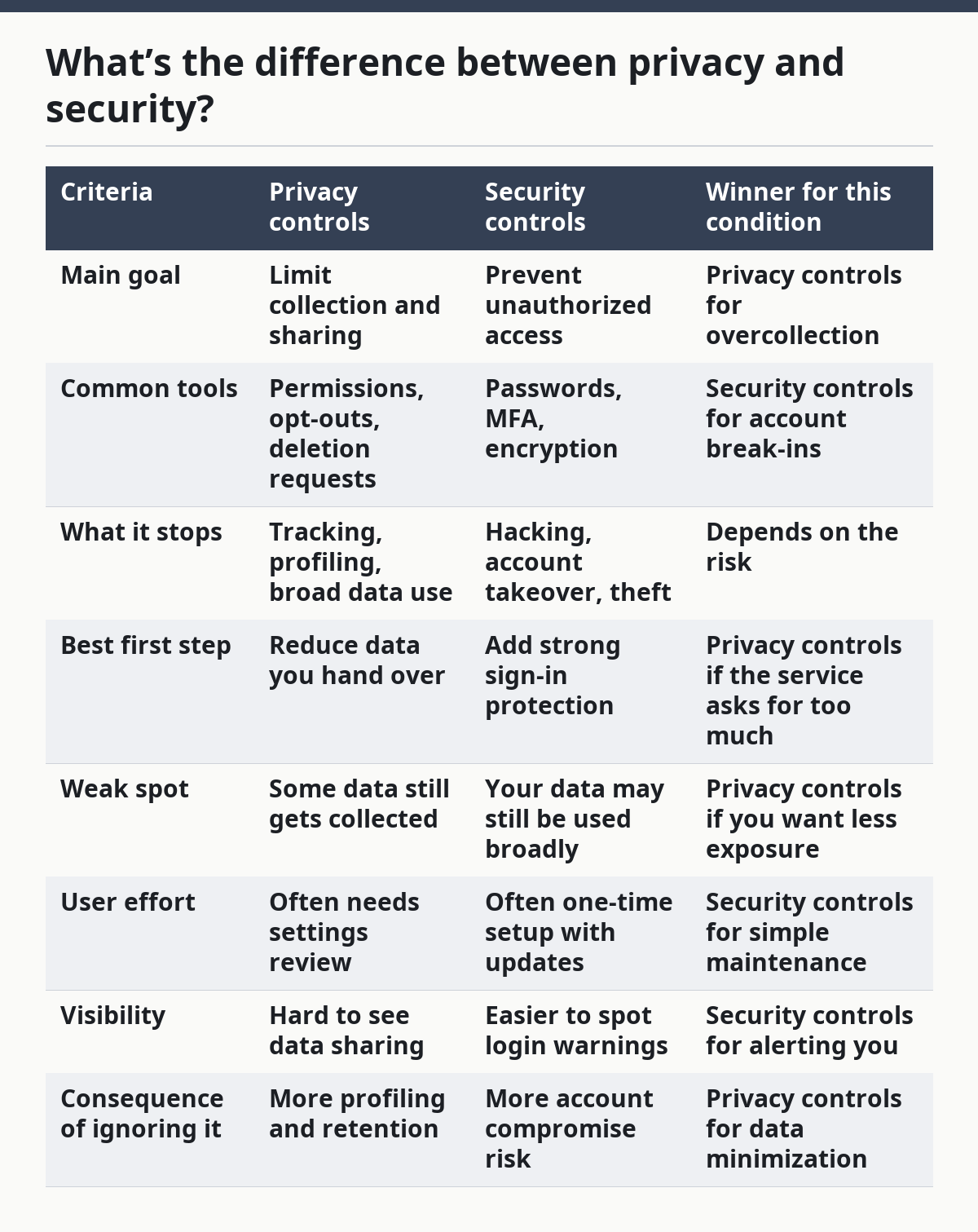
The honest answer is that both matter. But if the question is, “How do I stop a company from learning more than it needs to know?” privacy controls win. If the question is, “How do I keep strangers out of my account?” security controls win.
When should I share less data?
Share less data whenever the service can still work without the extra fields, and especially when the request feels unrelated to the task. A checkout page that asks for a delivery address is normal; a notes app asking for contacts is not.
The best example is sign-up friction. If a service wants your birthday, location, contacts, and phone number before you can even try it, that is a warning sign. The more fields a company collects up front, the easier it is to build a profile later. That profile can be used for ads, personalization, or sharing with partners, even if you never intended any of that.
There is one trade-off here: less data can mean fewer features. A map app may need location to work well, and a photo backup service needs access to your files. The point is not to refuse every request. The point is to separate necessary data from optional data, then decline the extra pieces.
What privacy questions should I ask about apps and websites?
The best privacy questions are the ones that force a clear yes or no: Do you need this data? Who else sees it? Can it be deleted? Those questions are simple enough to use in the moment and sharp enough to expose weak practices.
Here is the short list that does most of the work:
- What data do you collect from me?
- Why do you need it?
- Do you share it with advertisers, analytics firms, or other partners?
- How long do you keep it?
- Can I delete it, and what does deletion actually remove?
- What happens if I deny this permission?
- Can I use the service with less data?
If a service answers those questions in plain language, that is a good sign. If the answers are scattered across a 40-page policy and three support pages, the burden has shifted onto you, which usually means the company is keeping the advantage.
Which choice is better: default settings or privacy-by-design?
Privacy-by-design is the better choice, and default settings are wrong for anyone who does not want to audit every screen. Privacy-by-design means the product is built to collect less, share less, and ask before expanding access. Default settings often do the opposite: they make the broadest collection the easiest path.
That difference shows up in almost every product category. A service that starts with minimal permissions gives you less to fix later. A service that starts with everything turned on puts the cleanup on the user, which is a bad bargain if privacy matters at all.
This is where many generic privacy guides get too soft. They suggest that “good settings” solve the problem, but settings only help if the design is not already stacked against you. If a product keeps pushing broad permissions, privacy-by-design wins because it reduces the need for constant housecleaning.
What are the real trade-offs?
The real trade-off is convenience versus control, and there is no honest way around that. Some features depend on data. Some personalization depends on tracking. Some free services are paid for with information instead of money.
That does not mean every trade-off is fair. A weather app asking for location is different from a quiz app asking for contacts. The first has a clear reason. The second often does not. The more sensitive the data, the more the trade-off should be justified in plain words.
There is also a time trade-off. Privacy takes attention at the start: reading permissions, checking settings, and saying no to extras. That work pays off later because it shrinks what can be collected, shared, or exposed if something goes wrong.
What if the situation is sensitive?
If the situation is sensitive, stronger privacy steps matter more than convenience, and professional advice may be appropriate for legal, medical, or workplace issues. Sensitive situations include shared devices, work accounts, health topics, relationship safety, and any case where another person could be harmed by seeing the data.
In those cases, the usual advice to “just change a setting” can be too small. A browser history clear, a separate account, or a tighter permission set may help, but it may not be enough if the device itself is monitored or shared. The right move depends on the risk, and a privacy policy does not tell the whole story.
This is also where people overestimate consent. Clicking “agree” does not erase the real-world consequences of exposure. If the data could put someone at risk, the safer choice is to minimize it before it is stored at all.
Which privacy approach should you choose?
Choose privacy-by-design if you want the least data collection with the least maintenance. Choose settings-based privacy if the service already exists in your life and you need to reduce exposure without changing tools. Neither if the service needs broad data by nature and you cannot accept that exchange.
That is the practical answer. Privacy-by-design is the stronger choice because it reduces the problem before it starts. Settings are a backup, not the main defense, and they work best when you are fixing one account, one app, or one device.
FAQ
How do I know if a company shares my data?
A company shares your data if its policy says it passes information to advertisers, analytics firms, affiliates, or other partners. The clearest clue is language about “sharing” or “selling,” but broad “business purposes” language can also cover wide use. If the policy does not say clearly who sees the data, treat that as a warning sign.
Is privacy the same as anonymity?
No, privacy and anonymity are not the same thing. Privacy means controlling what others know about you; anonymity means they do not know it is you. Many everyday tools offer privacy controls without true anonymity, so the difference matters when the stakes are high.
What is the single most useful privacy habit?
The single most useful habit is to give only the data the service truly needs. That one step reduces tracking, sharing, and retention before they start. It is better than trying to fix everything later with settings.
Do privacy policies matter if I never read them?
Yes, because the policy still sets the rules for collection, use, and sharing. Not reading it does not make it disappear. If the policy is long, focus on the parts about data collected, third parties, retention, deletion, and user rights.
Drafted with AI; not yet reviewed by a person.