Last updated: November 19, 2026
Key Takeaways
- A pet insurance declarations page shows who is covered, the policy terms, and the money details that affect a claim.
- Read a pet insurance declarations page top to bottom, then compare each money term with the quote you received.
- Deductibles, reimbursement rates, and limits shape your bill because they affect how much the insurer pays on a covered claim.
- Check the pet identity, dates, deductible style, reimbursement rate, and endorsements before you enroll.
A pet insurance declarations page tells you the policy number, effective date, deductible, reimbursement rate, and limits before you pay. In this guide to How to Read a Pet Insurance Declarations Page Before You Buy, read that page first so you can spot the restrictions that may affect a later claim. The steps below show which fields matter, what each one changes, and what needs a second look.
Information only: this is not financial advice. Pet insurance terms, limits, and rules vary by insurer and country, so a qualified adviser should be consulted for your own situation.
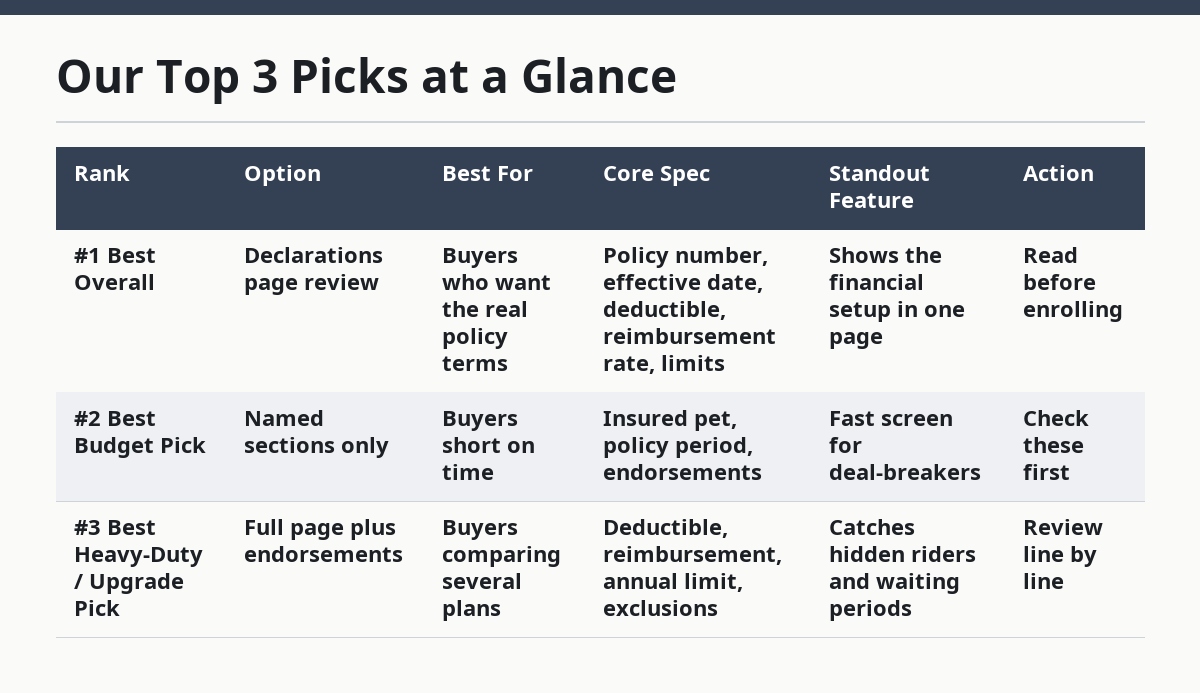
Our Top 3 Picks at a Glance
| Rank | Option | Best For | Core Spec | Standout Feature | Action |
|---|---|---|---|---|---|
| #1 Best Overall | Declarations page review | Buyers who want the real policy terms | Policy number, effective date, deductible, reimbursement rate, limits | Shows the financial setup in one page | Read before enrolling |
| #2 Best Budget Pick | Named sections only | Buyers short on time | Insured pet, policy period, endorsements | Fast screen for deal-breakers | Check these first |
| #3 Best Heavy-Duty / Upgrade Pick | Full page plus endorsements | Buyers comparing several plans | Deductible, reimbursement, annual limit, exclusions | Catches hidden riders and waiting periods | Review line by line |
| Product / Option | Best For | Core Spec | Standout Feature | Action |
|---|---|---|---|---|
| Declarations page review | Most buyers before enrollment | Policy number, effective date, deductible, reimbursement rate, limits | One-page summary of the financial structure | Use this as your first pass |
| Named sections only | Quick screen on a busy day | Insured pet, policy period, endorsements | Fast way to spot mismatched coverage | Check identity and dates first |
| Full page plus endorsements | Comparing plans with riders or add-ons | Deductible, reimbursement, annual limit, exclusions | Shows extra rules that change the base policy | Match the page to the quote before you enroll |
What a pet insurance declarations page actually tells you
A pet insurance declarations page tells you who is covered, what policy you are getting, and the money terms that shape a claim. It is the one-page summary that sits on top of the policy, and it often includes the fields that change your out-of-pocket cost the most.
Picture this: you are comparing two quotes that look almost the same, and one page hides a lower reimbursement rate behind a low premium. The declarations page is where that difference shows up in plain text. It is not the full contract, but it is the first sheet that tells you whether the plan fits your budget and your pet.
- Policy number: the insurer’s tracking number for the contract.
- Effective date: the date coverage starts, often tied to waiting periods.
- Deductible: the amount you pay before the plan starts sharing costs.
- Reimbursement rate: the share the insurer pays after the deductible.
- Limits and endorsements: caps, riders, or add-ons that change the base plan.
How do I read a pet insurance declarations page?
You read a pet insurance declarations page from top to bottom, then compare every money term with the quote you were shown. A good first pass starts with identity and dates, then moves to cost-sharing and limits, because a mismatch in any of those can change whether a claim pays.
Picture this: you have the page open on your phone and the agent’s quote in another tab. You are not hunting for fine print yet — you are checking the fields that can change the math. Start with the labels that name the policy and end with the rules that narrow it.
- Locate the policy number and verify it matches the quote or application exactly; a different number can mean you are looking at the wrong contract, which is a red flag.
- Check the named insured pet and make sure the species, breed, age, and microchip or ID details match your animal; a mismatch can make a claim harder to file.
- Confirm the effective date and compare it with any waiting period shown elsewhere; if the start date is after the date you need coverage, the plan does not solve that gap.
- Read the policy period for the start and end dates; if the term is 12 months or another fixed period, note when renewal or repricing may happen.
- Find the deductible and write down whether it is annual, per-condition, or another type; the wrong deductible type changes what you pay before reimbursement begins.
- Check the reimbursement rate and match it to the quote, such as 70%, 80%, or another stated share if the insurer lists one; if the page and quote differ, stop and ask for a corrected copy.
- Review the annual or per-condition limit and look for a dollar cap or a listed ceiling; if the cap is lower than you expected, the plan can run out sooner than you planned.
- Scan endorsements for riders, wellness add-ons, or special exclusions; if the page points to extra forms, those forms matter as much as the main page.
The truth is, most mistakes happen in the middle of the page, not at the bottom. A reader sees “80% reimbursement” and skips the deductible type, then finds out the claim math works differently than expected. That is why the page needs a line-by-line check, not a glance.
Which fields on the declarations page change your bill the most?
The deductible, reimbursement rate, and limit change your bill the most because they control how much the insurer pays after a covered claim. Those three fields work together, so a small change in one can matter more than a flashy premium discount.
Picture this: two pages both show a clean monthly quote, but one uses a higher deductible and a lower limit. The monthly price may look better on the surface, yet the declarations page can show a very different claim result. The cheaper-looking policy is not always the cheaper one after a vet bill.
- Deductible type: annual deductibles usually reset once per policy term, while other structures may work differently.
- Reimbursement rate: this is the percentage the plan shares after you meet the deductible.
- Limit: this is the ceiling on what the insurer pays, and it may be annual or per condition.
- Waiting period: if the page points to one, it can delay coverage even after the effective date.
When the page does not spell these out cleanly, ask for the declaration and schedule side by side. A page that says “see endorsements” without attaching them is incomplete, not helpful.
What should I check before I enroll?
You should check the pet identity, the dates, the deductible style, the reimbursement rate, and every endorsement before you enroll. Those five checks catch most of the issues that later become claim disputes.
Picture this: you are one click away from buying, but the page lists your cat under the wrong breed or leaves the end date unclear. That is the moment to slow down. Most of the check takes less than 10 minutes if the documents are complete.
- Match the pet details to the application.
- Match the effective date to the day you need coverage.
- Match the deductible to the structure you expected.
- Match the reimbursement rate to the quote.
- Match the limit to the amount of protection you actually want.
- Match the endorsements to any add-ons you selected.
- Match the policy number across every page you received.
If one line is missing, that is not a small clerical issue. It can mean the policy was not issued the way you think it was.
When should you stop and ask for a corrected copy?
You should stop and ask for a corrected copy if the declarations page does not match the quote, the insured pet is wrong, or the effective date is unclear. Those are not cosmetic errors; they can change whether a claim is covered at all.
Picture this: the page shows the right premium but the wrong reimbursement rate, or it names a different pet entirely. You do not need to guess what the insurer meant. You need the document fixed before you enroll.
The policy number is wrong: the document may be for another contract — ask for a corrected declarations page before you pay.
The named insured pet is wrong: the policy may not track your animal correctly — request a revised page with the proper breed, age, or ID details.
The effective date is after your planned start: coverage may not begin when you expect — wait for a corrected start date or a new issue date.
The deductible or reimbursement rate differs from the quote: the pricing math changed — get the insurer to confirm the final terms in writing.
The page references missing endorsements: you may not have the rider that was sold to you — ask for the attached form before you proceed.
A page that creates confusion before purchase usually creates claims trouble after purchase. Big mistake.
What do endorsements and limits mean on the page?
Endorsements are add-on terms that change the base policy, and limits are the caps that control how much the insurer will pay. Together, they show whether the policy is plain-vanilla coverage or a plan with extra rules attached.
Picture this: you think you bought a standard plan, but the declarations page points to a wellness rider, a hereditary condition exclusion, or a special cap on one type of treatment. That is why you read the endorsement line, not just the premium line. If the page says “subject to attached endorsement,” you need the attachment, and if the wording is unclear, consult a qualified professional before you rely on it.
- Endorsement: a written change to the policy form.
- Annual limit: the most the plan pays in one policy year, if the insurer uses that structure.
- Per-condition limit: a cap tied to one illness or injury, if listed.
- Rider/add-on: extra coverage or a rule change sold with the policy.
A limit that sounds high is not enough by itself. The structure matters just as much as the number or cap label.
What a good declarations page looks like
A good declarations page is clear, complete, and consistent across every document you received. It names the pet, the policy number, the effective date, the deductible, the reimbursement rate, and the limit in a way that does not force you to guess.
Picture this: you finish the page and there are no missing fields, no crossed-out numbers, and no surprise references to extra forms. That is what “clear” looks like in practice. It lets you see the terms before you commit.
A decent page should let you answer three questions in under a minute:
- Who is covered?
- When does it start?
- How does the claim math work?
If the page cannot answer those, the issue is not your reading speed. The issue is the document.
How does this page fit with the rest of the policy?
The declarations page sits on top of the full policy, but it does not replace the policy form, exclusions, or endorsements. It is the short map, not the whole road atlas.
Picture this: you are trying to choose a plan and you want the fast version first. That is the right use for the declarations page. Then, if you want the broader structure behind it, the hub on Choosing the Right Pet Insurance Policy Structure helps you place this page in the larger policy package without repeating the full contract here.
The key limit is simple: if a term is only hinted at on the declarations page, the attached policy text controls the details. That is why the page is useful before you buy, but not enough by itself for a final decision.
FAQ
What information is on a declarations page?
A declarations page lists the policy number, the named insured pet, the effective date, the policy period, the deductible, the reimbursement rate, and any limits or endorsements shown for the plan. It is the summary sheet that tells you the main financial terms before you rely on the full policy wording.
Is the declarations page the same as the policy?
No, it is not the same as the full policy. The declarations page is the summary of the contract, while the policy text and endorsements contain the detailed rules, exclusions, and claim conditions that fill in the rest. If the summary and the policy text conflict, the policy documents need a closer read.
What should I check before I enroll?
Check the pet’s identity, the policy number, the effective date, the deductible type, the reimbursement rate, and any limits or endorsements. Those fields tell you whether the plan matches the quote and whether the coverage starts when you expect. If any of them are unclear, ask for a corrected copy before you pay.
Drafted with AI; not yet reviewed by a person.